Menu-bar translation for macOS
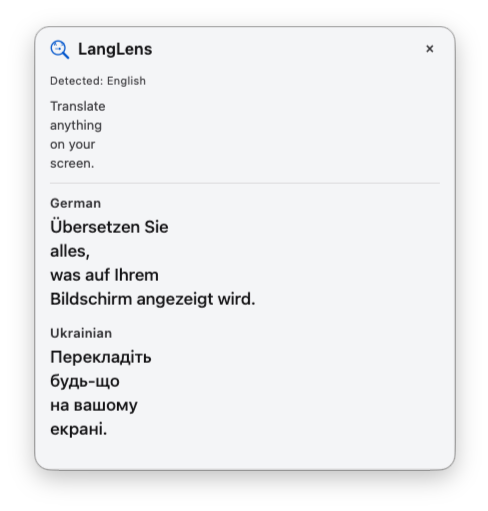
Translate anything
on your screen.
Highlight text, drag-select on screen, multi-select regions, or type into Quick Translate. Read it in up to two languages. On-device OCR. Only the words you select are sent to a third-party translation service.
What LangLens is
LangLens is for people who keep hitting language on a Mac screen and need the meaning without leaving the work. Designers, support, ops, researchers, bilinguals, anyone reading a foreign UI, PDF, deck, or message mid-task. It translates where you already are, so understanding the screen does not cost a context switch.
Three keystrokes from foreign to familiar.
-
⌘⇧Space
Press
If text is highlighted, LangLens translates it. If not, the screen freezes for drag-select OCR.
-
Select
Drag a box around any text: a PDF, an app, a video frame, anything visible.
-
Read
Your text is translated into the languages you set in Settings. Pin a bubble to keep it and capture another.
⌘⇧M
Multi-Translate
Capture up to ten sections of your screen and get numbered translations in place, so you can run multiple translations from a single area without leaving it.
⌘⇧T
Quick Translate
A dedicated input for text. Type or paste, and the translation updates as you go, so you stay in flow instead of jumping to another tab or app.
Questions
On your Mac.
Then a third party.
Text is recognized on your Mac with Apple’s Vision engine. The words you select are sent to a third-party translation service to be translated. LangLens does not own or operate that service, and does not keep a history. Read the Privacy Policy for the full detail.